VarianTrade
Algorithmic trading that lives in your Telegram
Signals with entry, stop and target. Execution on MetaTrader 5. Risk limits that are enforced, not suggested. No app to install.
- Telegram-native
- MetaTrader 5
- Copy trading
- Managed accounts
- Backtesting
- Paper mode
 MetaTrader 5
 MetaCopier
- TradingView
- Telegram
- Binance
 Finnhub
 Alpha Vantage
 Yahoo Finance
 CoinGecko
 OpenAI
- DeepSeek
- Firebase
How it works
Three steps, all inside the chat
Connect
Link your MetaTrader 5 account through the bot. Credentials are stored encrypted and never displayed back to anyone, including support.
Set your limits
Define max position size, daily drawdown ceiling, max open positions, and default stop loss. These are enforced at execution time, not suggested.
Trade
Signals arrive in Telegram with entry, stop loss, take profit, strategy and confidence. Execute them yourself, or enable auto-trade.
In the conversation
Ask about the chart, then inspect the reasoning
These are real VarianTrade conversations. The response explains what was detected, separates evidence from uncertainty, and calls out when levels in an uploaded chart no longer match the supplied market context.
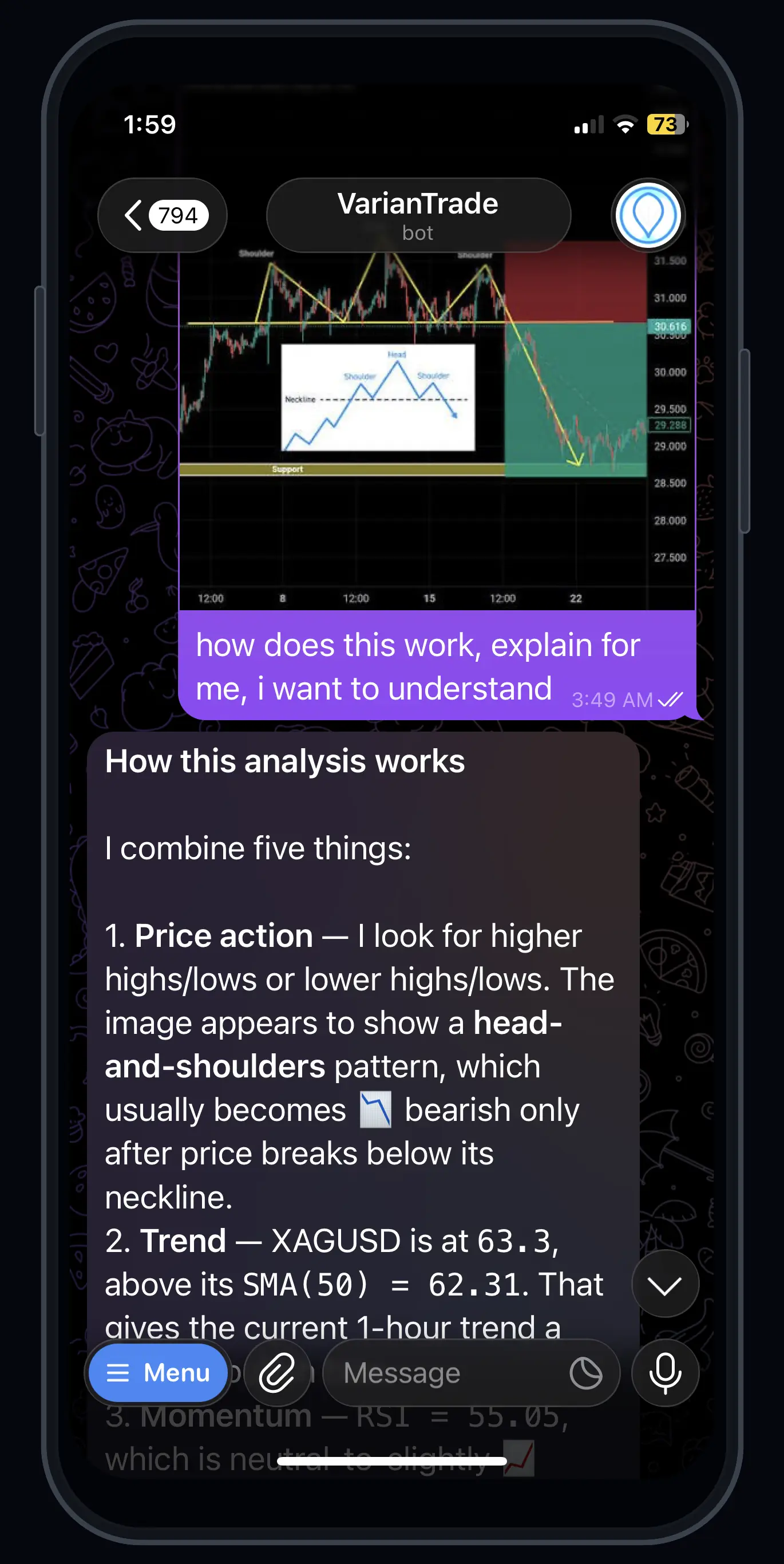
Analysis you can interrogate
Upload a chart and ask what the structure means. VarianTrade breaks the response into price action, trend, momentum, volatility and other available evidence instead of returning an unexplained direction.
- Pattern interpretation stays conditional.
- Indicators are shown with their observed values.
- Uncertainty remains visible in the answer.
Know what to verify before acting
A recommendation should expose its instrument, thesis, entry trigger, invalidation, targets, position size and liquidity assumptions. VarianTrade keeps those checks in the conversation so you can question the reasoning before deciding what to do.
Read the risk-first checklist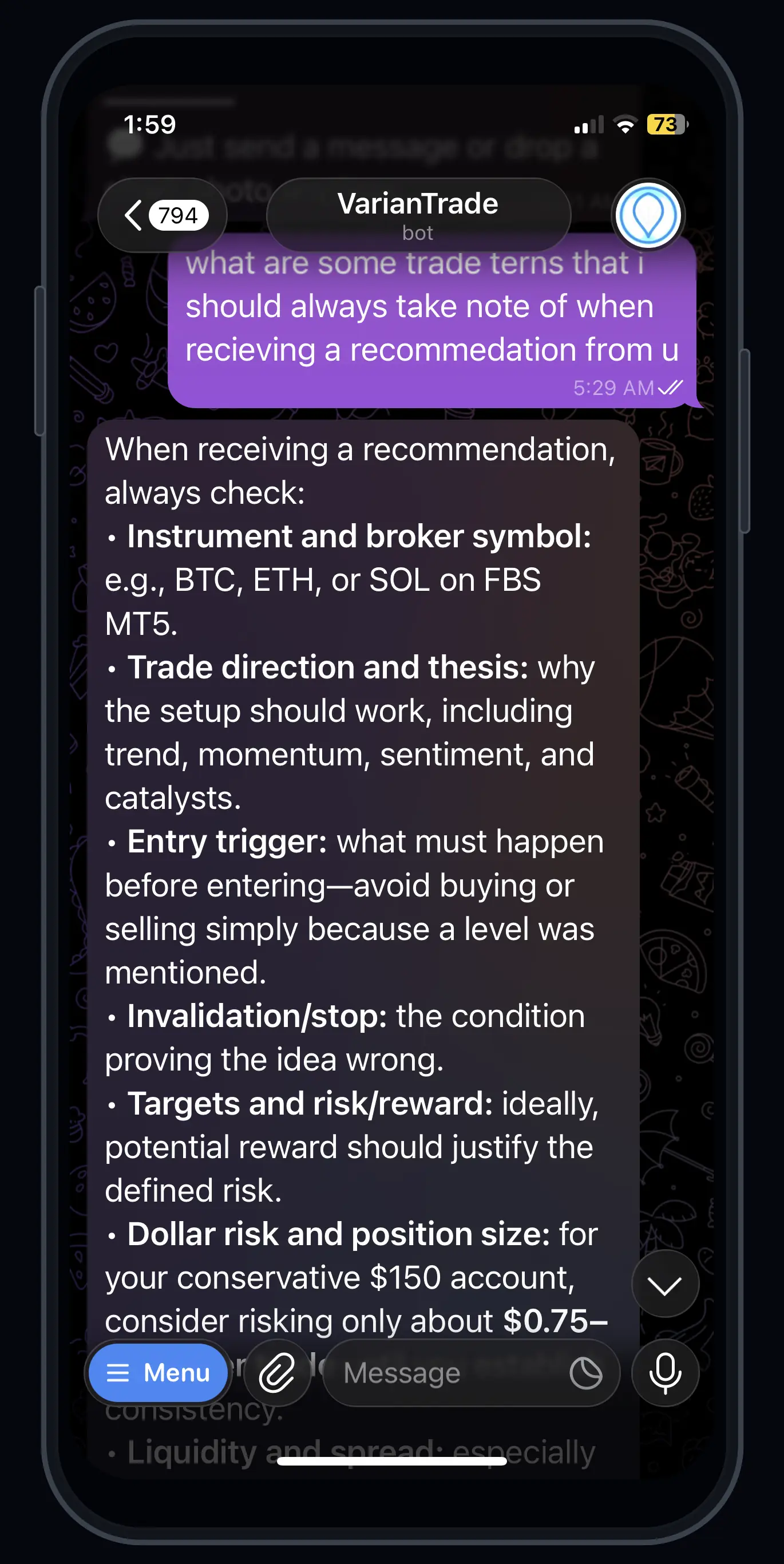
Capabilities
What the system actually does
Every item below is a shipped capability, not a roadmap entry.
Signal generation
Each signal carries its asset, direction, entry, stop loss, take profit, originating strategy and a confidence score — not just a direction.
Independent second check
A separate review stage evaluates every signal before it can execute. If that stage is unavailable, signals are blocked rather than passed through.
Enforced risk limits
Position sizing, daily drawdown, open-position count and stop loss are checked on every execution path before an order reaches the broker.
Copy trading
Follow another account with your own ratio, notional cap, daily loss cap, and per-symbol allow or block lists. Your limits, not theirs.
Managed accounts
Allocate to a trader or strategy with a defined risk profile. Profit share is calculated against a high-water mark, so you are never charged twice for the same gain.
Backtesting
Run a strategy over historical data before committing capital, and compare those results against what the same strategy did live.
Market context
Sentiment scoring and an economic calendar feed into signal generation, with configurable blackout windows around high-impact events.
Outcome tracking
Every signal is followed to its result — win or loss, realised risk-reward, exit price. Strategy performance is measured, not asserted.
Paper mode
Run the entire system against your real settings without real money, and switch to live only when you decide to.
Connect your own AI
Add VarianTrade to Claude or ChatGPT as a connector, or bring your own provider API key. Your AI account does the thinking and is billed to you, not to us.
AI cannot place your trades
A connected AI can read your scoped data and propose a trade. It cannot execute one. Every proposal expires and needs your explicit tap in Telegram first.
Comparison
How this differs
Compared against approaches rather than named products — what a rival ships today can change tomorrow, and we would rather not assert things we cannot verify.
| Capability | VarianTrade | Signal groups | Copy-trade apps | Manual trading |
|---|---|---|---|---|
Signals include entry, stop and target | ||||
Independent second review before execution Generation and approval are separate stages | ||||
Fails closed when review is unavailable No verdict means no trade | ||||
Risk limits enforced at execution Not advisory — checked before the order reaches the broker | ||||
Daily drawdown ceiling with auto-halt | ||||
Every signal tracked to its outcome Win/loss, realised R:R, exit price | ||||
Backtest against live comparison | ||||
Your own broker, your own custody | ||||
Paper mode on your real configuration | ||||
Runs without installing anything | ||||
Per-symbol allow and block lists | ||||
High-water-mark profit share Never billed twice for the same recovery |
Controls
Every signal passes a second, independent check
Generating a signal and approving it are two separate stages. If the review stage cannot reach a verdict, the trade does not execute. The system fails closed — missing a trade is recoverable, an unreviewed position is not.
- Max position size, as a percentage of account equity
- Daily drawdown ceiling, with automatic halt on breach
- Maximum concurrent open positions
- Default stop loss and take profit on every order
- Per-symbol allow and block lists
- Auto-close on loss threshold
Setup
Getting running
Six steps, all inside the chat. Nothing here requires leaving Telegram.
- 01
Open the bot
Send /start to the VarianTrade bot. Your Telegram account is your identity — no email or password is required to create an account.
Takes about 10 seconds.
- 02
Connect your broker
Run /broker and follow the prompts to link your MetaTrader 5 account. Credentials are encrypted at rest and never displayed back — not to you, not to support.
Read/trade access only. Never withdrawal permissions.
- 03
Set your risk limits
Define max position size, daily drawdown ceiling, max concurrent positions and default stop loss. These become hard constraints, checked before any order reaches your broker.
Change them any time with /settings.
- 04
Start in paper mode
Paper mode is on by default. The full system runs against your real configuration with simulated fills, so you can watch how it behaves before any capital is exposed.
Stay here as long as you want.
- 05
Take your first signals
Signals arrive in chat with asset, direction, entry, stop, target, strategy and confidence. Execute them one at a time yourself, so you can see the reasoning before trusting it.
Manual execution first is the recommended path.
- 06
Go live when you decide
Switch off paper mode, and optionally enable auto-trade so approved signals execute without confirmation. Both are reversible at any moment.
Auto-trade still obeys every limit from step 3.
Bring your own AI
Use VarianTrade from the AI you already pay for
Two ways in, both shipped. Connect an MCP-capable app to your account, or run our companion on your own machine so your existing Claude or Codex subscription does the work. Your AI billing stays with your AI provider.

Remote MCP server
Add VarianTrade as a remote MCP server in any MCP-capable app. It is listed in the official Model Context Protocol registry, so apps that browse the registry can find it directly.
Server URL
https://api.variantrades.com/mcp/rpcScopes you approve
- market.read
- portfolio.read
- signals.read
- risk.read
- account.read
- trade.propose
Adding the server opens VarianTrade authorization. You review the exact permissions in Telegram, then approve or deny. Seven tools are exposed across those scopes.

Local companion (CLI)
A small Rust program that runs on your machine. VarianTrade sends it a prompt; it runs that through a provider CLI you have already signed into — Claude Code or Codex — and returns the text. Your subscription does the thinking, on your hardware.
Install
cargo install variantrade-bridgePublished on crates.io. Needs a Rust toolchain (1.86+) from rustup.rs. Pre-built binaries are not published yet.
Then
variantrade-bridge providers
variantrade-bridge enroll --code <CODE>
variantrade-bridge run
Get the one-time code from /ai_connections in Telegram. It expires in 15 minutes and works once.

Agent skill · skills.sh
Varian trading skill
Install it into your own AI and it will handle trading questions the way this platform does: no price without a source and a timestamp, position size derived from the loss you accept rather than a lot count, invalidation defined before entry, and a trade proposed for your confirmation instead of executed. It also teaches your agent how to connect to the MCP server above.
 Claude
 Codex
Codex Cursor
 Copilot
 Geminiand others.
npx skills add Chidi09/varian-trading-skillIt cannot place a trade
The only write-capable tool proposes. A proposal expires, and executing it still needs your explicit tap in Telegram.
You approve the scopes
Authorization opens in Telegram, where you see the exact permissions before approving. Read access is scope-limited.
Your keys stay yours
The companion never uploads a provider credential, session token or browser cookie. Nothing in the flow asks for one.
Revocable instantly
Revoke a connection or a device from Telegram and its access stops working immediately.
Straightforward plans
Broker fees and spreads are charged by your broker, not by us. You keep custody of your funds throughout.
Free
5 AI chart reads / day
Send a chart, get the read — entry, stop and target. AI chat, signals and live trading need a plan.
Signals
20 AI chats · 10 chart reads / day
Every signal, the chart read and trade help. No broker linking and no auto-trade. Outside Nigeria you see and pay the equivalent in your own currency.
Every purchase buys one term and does not renew by itself. Naira prices are charged in your own currency outside Nigeria.
FAQ
Questions worth asking
Do I need to install anything?
No. VarianTrade runs entirely inside Telegram. There is no app to install and no dashboard to learn — you interact with the bot in a chat.
Which broker do you use?
Execution runs through MetaTrader 5. You connect your own MT5 account, and your funds stay with your broker at all times. VarianTrade never holds client money.
What happens if the signal review stage goes down?
Trading halts. The review stage fails closed by design — if it cannot evaluate a signal, that signal does not execute. We would rather miss an opportunity than take an unreviewed position.
Can I try it without risking money?
Yes. Paper mode runs the full system against your real configuration using simulated fills, so you can see how it behaves before going live.
How is profit share calculated on managed accounts?
Against a high-water mark. You are only charged on new profit above the highest balance the account has previously reached, so a recovery from a drawdown is not billed twice.
Can I lose money?
Yes. Trading leveraged instruments carries substantial risk and you can lose your entire deposit. The risk controls in this system are designed to limit exposure, not to eliminate loss. Only trade capital you can afford to lose.
Start in paper mode.
Go live when you're ready.
No installation, no dashboard to learn. Open the bot and it walks you through connecting an account.